
 Download
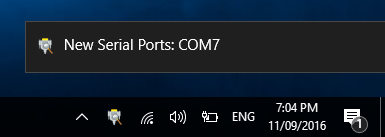
Serial Port Notifier (formerly Serial Port Monitor) sits in your notification tray and monitors the serial ports on your computer. When a port is added or removed, a notification is shown containing the port's COM port name, allowing you to easily keep track of what's been plugged in and out. Program launchers can be defined that allow programs to be quickly started using the selected serial port. Custom labels can also be added to ports to allow for easy identification.
Features
- Get notified when serial ports are added or removed.
- Quickly launch custom programs using the selected port.
- Add custom labels for easy identification.
Project Samples


License
MIT LicenseFollow Serial Port Notifier
Other Useful Business Software
Automate Proposals with AI in Microsoft Word.
Automate your best practices, processes, and standards to guide your proposal writers, sales teams, and subject experts. And don’t worry, it’s so easy to use they will use it. We would love the opportunity to help you quantify the impact your business can expect from investing in Expedience Software. Click here to request a Return on Investment (ROI) calculation. In this 15-minute session, we will ask 20 simple questions to assess and grade your current proposal quality and scalability. Manual proposal processes are likely costing you far more than you realize. These models waste time and kill the productivity of proposal writers, sales team members, senior staff, and subject experts.
Rate This Project
Login To Rate This Project
User Reviews
-
I’ve been using Serial Port Notifier for a while now and it’s proven to be an excellent tool for monitoring COM ports on a Windows system. It delivers just what it promises with a clean and intuitive interface, making it easy to keep track of serial port connections and activity without any fuss. What I like most: Straightforward setup — the program installs quickly and starts working right away. Real-time visibility of COM port changes, which is invaluable when debugging hardware or managing multiple serial devices. Lightweight and efficient: it doesn’t hog resources or complicate the workflow. Great reliability — I haven’t experienced crashes or odd behaviour, even when switching devices frequently. One or two minor improvements that could make it even better: A few additional customization options (such as notifications, logging features, or filtering by device type) would elevate its usefulness for more advanced workflows. Occasional updates would help ensure compatibility with the latest versions of Windows and newly-emerging serial hardware. Final verdict: If you’re working with serial equipment or need to monitor COM ports for debugging or development tasks, Serial Port Notifier really does the job well. It’s a solid choice for a free tool in its category. I’d happily recommend it and give it 5 out of 5 stars.
-
Good tool for me to minitor serial COMs.



